Zenvlo CRM guide
Follow-ups
Never forget to call, email or chase. Every follow-up has an owner, a time and a reminder.
Open Follow-ups in the sidebar.
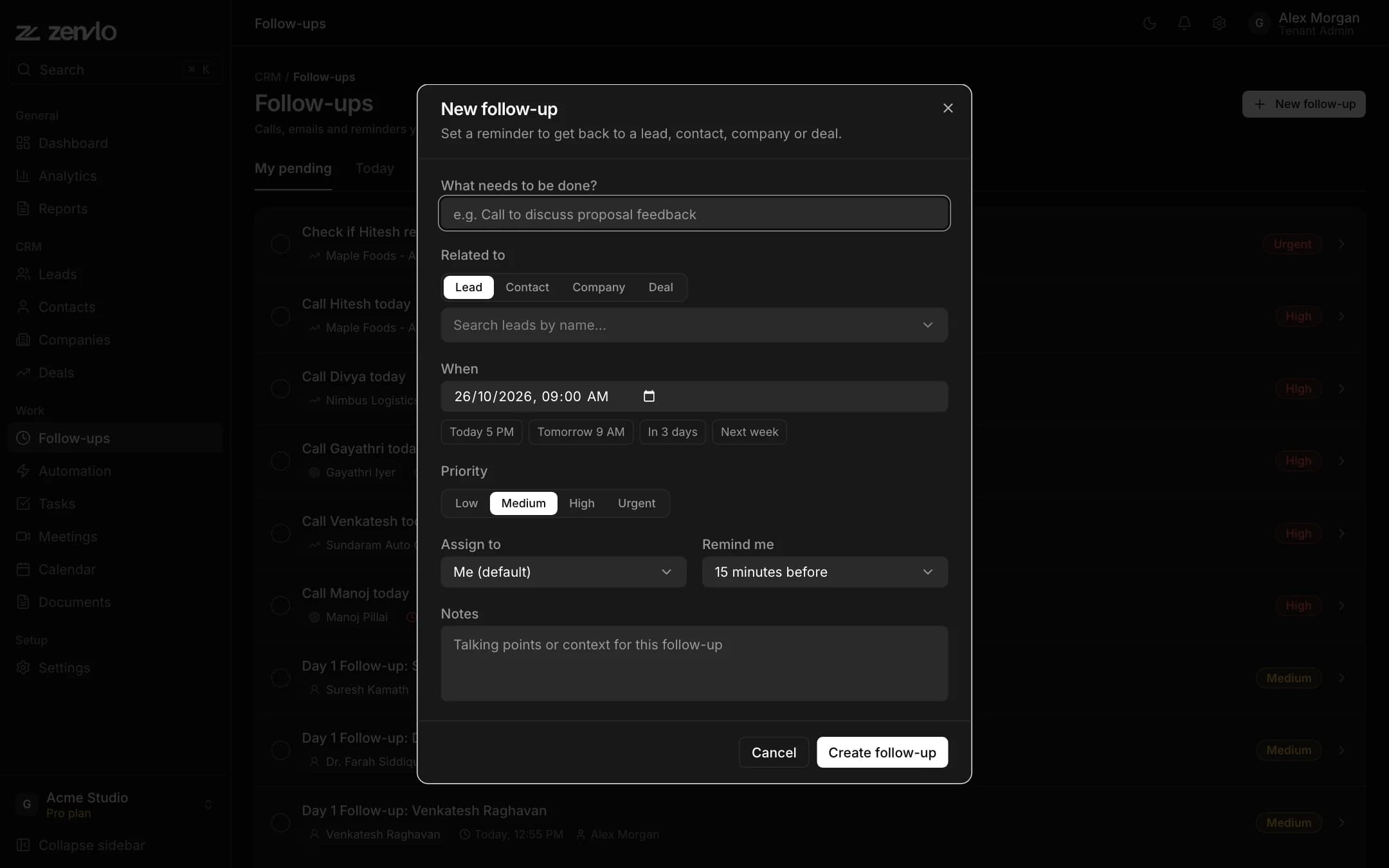
Create one
- 1Press New follow-up.
- 2Write What needs to be done? for example "Call Priya about the quote".
- 3Under Related to choose Lead, Contact, Company or Deal, then type the name and pick it from the list. You never type an ID.
- 4Choose When, using the quick buttons Today 5 PM, Tomorrow 9 AM, In 3 days or Next week.
- 5Set the Priority (Low, Medium, High or Urgent) and Assign to (it is you by default).
- 6Choose Remind me: at the time, 15 minutes before (the default), 30 minutes, 1 hour or 1 day before.
- 7Add notes and press Create follow-up.
Work through them
| Tab | Shows |
|---|---|
| My pending | Everything you still need to do. |
| Today | Due today. |
| Upcoming | Due later. |
| Overdue | Past their time and not done. |
| Missed | Missed completely. |
| All follow-ups | Everyone’s, with search and filters for record type, priority and status. |
Tick the circle on a row to mark it done. Click a row to Complete, Reschedule (with an optional reason) or Cancel it.
Stuck? Talk to us and a real person will help.